We’re happy to announce the launch of the Favethemes Portal — a dedicated platform to manage your Houzez theme license, downloads, updates, and access the Houzez Studio template library, all in one place.
Visit the portal at https://app.favethemes.com
Why Use the Portal?
Automatic Updates — Once connected, you’ll receive theme and plugin updates directly in your WordPress dashboard. No more manual downloads and FTP uploads.
One-Click Downloads — Access the latest Houzez theme and all bundled plugins anytime, without digging through ThemeForest emails.
Houzez Studio Access — Active license holders get full access to the Houzez Studio template library. Browse and import pre-built templates and sections directly from your WordPress dashboard.
Site Management — See all your connected sites, check which versions they’re running, and deactivate old domains when needed. Staging and localhost sites are supported without using your activation slot.
Envato Integration — Connect your Envato account and we’ll automatically detect your ThemeForest purchases. No need to search for purchase codes.
How to Get Started
- Download and install Houzez v.4.3.0
- Go to your WordPress dashboard and click Connect&ActivateLicense under Houzez->License
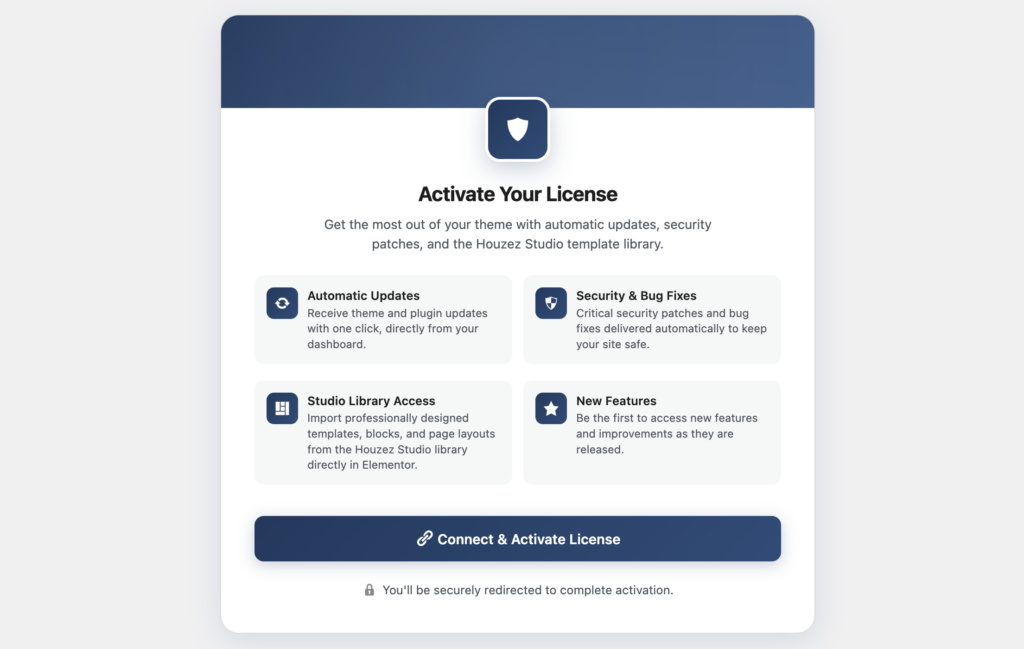
- Create an account or sign in with your Envato/Google account
That’s it — your site is now connected and will receive automatic updates and Houzez Studio access going forward.
Need Help?
If you run into any issues during verification, you can submit a review request directly from the portal and our team will take care of it.
We built this to make managing Houzez simpler. We hope you enjoy it.
—The Houzez Team