Elementor has become one of the most widely used page builders in the WordPress ecosystem. Agencies and freelancers rely on it to design websites faster, reduce custom development, and give clients the ability to manage their own content after launch.
Real estate is one of the most demanding niches for website development. A standard business website does not cut it. Agencies building for real estate clients quickly discover that they need more than a page builder. They need property management, advanced search, dynamic listing pages, and lead capture tools working together.
Using Elementor for real estate websites is a smart approach when you understand its capabilities and its limits. This guide covers everything you need to know: what Elementor does well, where it falls short on its own, and how to combine it with the right real estate platform to deliver fast, scalable, high-performing websites for your clients.
What Is Elementor?
Elementor is a drag-and-drop website builder for WordPress. It lets developers and designers build pages visually, without writing HTML or CSS for every component. It was launched in 2016 and quickly became the dominant page builder in the WordPress space.
At its core, Elementor works in real time. You drag widgets onto the canvas, adjust settings in the left panel, and see the result instantly. There is no preview step. What you see in the editor is what appears on the live site.
Elementor Pro extends this with Theme Builder, which lets you design headers, footers, archive pages, and single post templates visually. Dynamic content support means widgets can pull real data from custom fields, post types, and external sources. This is critical for real estate use cases, where every listing page needs to display property-specific data.
The ecosystem around Elementor is large. Thousands of templates, add-on plugins, and integrations are available. This gives agencies a head start on almost any project type, including real estate.
Why agencies rely on Elementor: it reduces the gap between design and development. A skilled developer using Elementor can build and deliver a complex website far faster than custom coding the same result from scratch.
Why Elementor Is Popular for Real Estate Websites
Several factors make Elementor a popular choice specifically for real estate website projects.
Faster Development
A developer building a property listing website from scratch might spend several weeks on front-end templates alone. With Elementor, layout work that used to take days can be completed in hours. Pre-built section blocks and page templates eliminate repetitive work and let developers focus on configuration and customization.
Reduced Coding Requirements
Not every agency has a deep bench of front-end developers. Elementor allows designers and junior developers to contribute meaningfully to a project. Custom CSS and JavaScript are still available when needed, but they are rarely required for standard real estate pages.
Client-Friendly Editing
Real estate agencies often want to update their own content after launch. Elementor provides an editing interface that clients can learn quickly. You can restrict access to specific sections so clients can edit text and images without breaking the site layout.
Large Ecosystem
Elementor has a large library of third-party add-ons and integrations. Real estate-specific widgets, form builders, and map integrations are all available. When you combine Elementor with a real estate theme that was built around it, the options expand significantly.
Reusable Templates
One of the biggest efficiency gains for agencies comes from reusability. Once you build a homepage layout, a property detail page, and an agent profile template, you can reuse them across future client projects with minimal adjustment. This is how agencies scale their real estate practice without scaling headcount.
Rapid Project Delivery
Real estate clients typically have tight timelines. They want to see results quickly. An agency using Elementor with a solid real estate theme can deliver a fully functional website in a fraction of the time a custom build would take. Faster delivery improves client satisfaction and frees the team for the next project.
What Makes Real Estate Websites Different?
A standard Elementor website works well for most businesses. Real estate websites have requirements that go well beyond standard.
Here is what a professional real estate website needs to function properly:
- Property Listings — a structured system for adding, managing, and displaying properties with consistent fields like price, beds, baths, size, and status.
- Advanced Property Search — filters that allow visitors to search by location, price range, property type, number of bedrooms, and other criteria.
- Interactive Maps — map-based search and display, often using Google Maps or Mapbox, to show where properties are located.
- Agent and Agency Profiles — dedicated pages for agents and offices with contact forms, listings, and credentials.
- Area Pages — content-driven pages targeting specific neighbourhoods or cities, designed to capture local search traffic.
- CRM Integration — a way to capture leads from listing inquiries and contact forms and route them to a CRM or email system.
- Lead Generation — strategically placed enquiry forms, mortgage calculators, and call-to-action elements that convert visitors into prospects.
- MLS and IDX Support — the ability to import or sync property listings from a Multiple Listing Service, particularly for North American markets.
A generic page builder cannot provide most of this out of the box. Elementor handles design. It does not handle property data, search logic, or MLS connectivity. That is why agencies need to pair Elementor with a real estate theme or plugin that fills in these gaps.
Key Benefits of Using Elementor for Real Estate Websites
Faster Website Development
An agency using Elementor with a real estate theme can build and launch a full property website in one to three weeks, depending on complexity. Without a visual builder, the same project would take two to four times longer. The time savings come from visual editing, pre-built templates, and the ability to iterate designs rapidly based on client feedback.
Example: A two-person agency in Barcelona reduced their average real estate project timeline from six weeks to two and a half weeks after switching to an Elementor-based workflow. The template library eliminated nearly all repetitive layout work.
Easier Client Handover
When a project is complete, the client takes over. Elementor makes handover straightforward. You can walk a client through updating a banner, swapping an image, or editing text in a single session. Clients do not need developer support for routine content updates, which reduces your long-term maintenance burden.
Design Flexibility
Real estate clients often have strong preferences about how their website looks. Some want minimal and modern. Others want something more traditional. Elementor’s design system gives you the flexibility to meet those requirements without rebuilding from scratch each time. Colours, fonts, spacing, and layout are all adjustable without touching code.
Responsive Design
Elementor includes device-specific controls for desktop, tablet, and mobile. You can adjust font sizes, column layouts, padding, and visibility independently for each device. This matters for real estate because a large portion of property searches happen on mobile devices.
Template Reusability
Agencies can save custom sections and page layouts as templates. Once a property card design is built, it can be imported into any future project instantly. Over time, this builds a reusable component library that makes every new project faster to deliver.
Lower Development Costs
Faster development means lower project costs, or higher margins at the same price. Agencies that standardise on Elementor for real estate development report consistent margin improvements because the tooling reduces the hours required per project.
Elementor vs Traditional Development
The following table compares Elementor-based development with traditional custom development for real estate websites.
| Factor | Elementor + Real Estate Theme | Traditional Custom Development |
|---|---|---|
| Development Time | 1–3 weeks | 4–12 weeks |
| Flexibility | High within the visual system | Unlimited, but time-intensive |
| Maintenance | Client can manage content | Requires developer for most changes |
| Client Usability | Intuitive visual editor | Often requires training or documentation |
| Cost | Lower (faster to build) | Higher (more developer hours) |
| Scalability | Good with reusable templates | Requires code refactoring over time |
| Real Estate Features | Available via theme/plugin | Must be built or integrated manually |
| Time to First Launch | Days to weeks | Weeks to months |
Essential Real Estate Website Features You Should Build with Elementor
Homepage
The homepage sets the tone for the entire website. With Elementor, you can build a hero section with a property search bar, a featured listings section using dynamic loops, and call-to-action blocks, all without custom code. Real estate homepages often need to look polished on the first visit because they compete directly with major portals.
Property Detail Pages
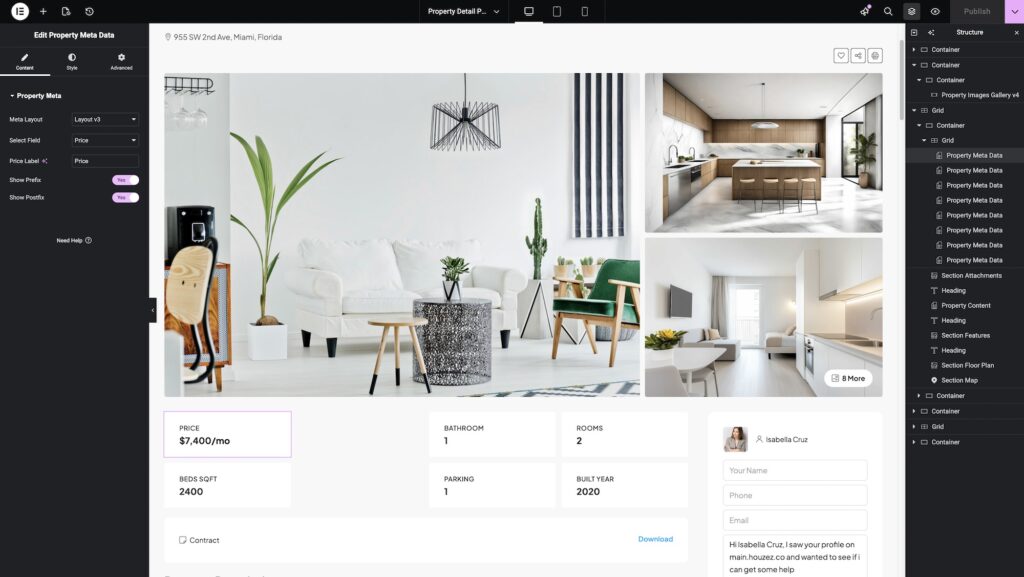
Each property needs its own detail page displaying photos, price, specifications, location, agent contact information, and related listings. In Elementor, this is built using a single template that pulls dynamic content from the listing’s custom fields. Build it once; it works for every listing automatically.
Agent Pages
Agent profile pages should show the agent’s photo, biography, active listings, and a contact form. Elementor allows you to design these once as a template and have them populate dynamically for every agent in the system. This saves significant time when a brokerage has dozens of agents.
Agency Pages
For multi-office brokerages, agency or office pages follow the same dynamic template approach. Each office page pulls the relevant listings, staff, and contact details automatically.
Area Pages
Area pages target local search queries. A page for ‘properties for sale in Austin’ needs neighbourhood descriptions, a map, area-specific listings, and local content. Elementor makes it straightforward to create a consistent template that you populate with area-specific content and data.
Landing Pages

Real estate agents often need dedicated landing pages for individual listings, open houses, or lead generation campaigns. Elementor’s landing page capabilities are strong. You can build high-converting pages with enquiry forms, virtual tour embeds, and gallery sections without developer involvement.
Search Results Pages
The search results page is where most serious buyers spend their time. It needs fast-loading property cards, working filters, and a clean layout. With a real estate theme that integrates with Elementor, this page is built as a template and powered by the theme’s search engine.
Lead Generation Forms
Every real estate website needs strategically placed enquiry forms. Elementor’s form widget, or a compatible form plugin, allows you to add forms to any page or template. When these are connected to a CRM, every submission creates an automatic lead record.
Building a Real Estate Website Workflow with Elementor
Here is a practical agency workflow for building a real estate website using Elementor and a dedicated real estate theme like Houzez.
- Install WordPress on a staging environment. Use managed WordPress hosting for better performance and easier migration.
- Install and activate the real estate theme. Configure general settings: currency, measurement units, contact details, and colour palette.
- Import starter templates. Most real estate themes provide pre-built demo content you can import as a starting point. This gives you a working homepage, listing pages, and agent templates immediately.
- Customise layouts in Elementor. Open each page template and adjust the design to match the client’s brand. Swap fonts, update colours, replace placeholder images, and refine spacing.
- Configure the property search. Set up the search fields the client needs: location, price range, property type, bedrooms, bathrooms. Connect the search to the listing database.
- Configure property listings. Import any existing listings or set up the listing submission workflow. Ensure all custom fields are mapped correctly to the templates.
- Test across devices. Check every page template on desktop, tablet, and mobile. Fix any responsiveness issues in Elementor’s device-specific view.
- Configure SEO. Install an SEO plugin like Yoast or Rank Math. Set up meta titles, descriptions, and schema for property types.
- Connect integrations. Set up the CRM connection, email marketing integration, Google Analytics, and any third-party tools the client uses.
- Launch. Migrate from staging to production. Test all forms, search functionality, and dynamic templates on the live environment.
Common Mistakes When Using Elementor for Real Estate Websites
Developers new to Elementor-based real estate projects often make the same mistakes. Knowing them in advance saves significant rework.
1. Installing Too Many Plugins
Every plugin adds load time and potential conflicts. Use only what you need. Before installing a plugin, check whether the real estate theme already includes that functionality.
2. Poor Mobile Optimisation
Elementor’s default desktop layout does not always translate cleanly to mobile. Always use the responsive controls to adjust column stacking, font sizes, and padding for smaller screens. Test on real devices, not just the browser simulator.
3. Overusing Animations
Entrance animations and scroll effects look appealing in the editor. On a live site, they slow page load and distract visitors who are trying to find property information. Use animations sparingly.
4. Ignoring Core Web Vitals
Google’s Core Web Vitals directly affect search rankings. Large images, render-blocking scripts, and excessive DOM complexity all hurt scores. Optimise images before uploading, use lazy loading, and test with PageSpeed Insights before launch.
5. Weak Template Structure
Building pages without a clear template hierarchy makes future edits painful. Define your templates clearly: a global header and footer, a property detail template, an agent template. Avoid duplicating layouts manually across multiple pages.
6. Slow Hosting
Elementor-built sites can be fast, but not on shared hosting. Use a managed WordPress host with server-side caching, a CDN, and PHP 8.x support. Cheap hosting is the most common cause of poor performance on otherwise well-built Elementor sites.
7. Not Using a Child Theme
Always use a child theme when making code-level customisations. If you modify the parent theme directly, your changes are overwritten when the theme updates.
8. Skipping SEO Configuration
Elementor handles design. It does not handle SEO. Install a dedicated SEO plugin and configure meta titles, descriptions, and schema for all major page types. Real estate websites compete heavily in local search, and poor SEO setup costs you rankings.
9. Hard-Coding Content That Should Be Dynamic
If you type an agent’s name directly into an Elementor widget, it stays there forever unless someone manually edits it. Use dynamic fields wherever property or agent data is involved. When a listing is updated, the templates update automatically.
10. No Staging Environment
Making changes directly on a live real estate website is risky. Always work on a staging copy, test thoroughly, then deploy. One broken template on a live site can remove all property listings from public view.
11. Ignoring Accessibility
Real estate websites serve a broad audience. Basic accessibility — sufficient colour contrast, keyboard-navigable menus, descriptive image alt text — improves usability for everyone and reduces legal exposure in many markets.
12. Over-Nesting Sections
Deeply nested Elementor sections create bloated HTML and make template editing confusing. Keep your layout structure as flat as possible. Use containers rather than sections where the theme supports them.
Elementor and SEO
Elementor itself is SEO-neutral. It produces clean HTML and does not add significant SEO obstacles, but it does not provide SEO features either. Your SEO results depend on how you configure the site and which SEO plugin you use alongside Elementor.
Site Structure
Real estate websites need a clear URL structure. Properties should be organised logically under categories or location-based taxonomies. Elementor lets you design the pages, but the URL structure comes from WordPress settings and the real estate theme’s taxonomy configuration.
Mobile Responsiveness
Google uses mobile-first indexing. Elementor’s responsive controls make it possible to build a mobile-optimised site, but you still need to verify that every template renders correctly on mobile. Use Search Console’s mobile usability report to identify issues after launch.
Core Web Vitals
Core Web Vitals measure loading speed, visual stability, and interactivity. Elementor sites can score well if you optimise images, minimise plugin bloat, and use good hosting. The Elementor editor itself loads additional assets, but these are only served to logged-in editors, not visitors.
Internal Linking
Real estate websites benefit strongly from internal linking. Area pages link to listings. Agent pages link to their active listings. Property pages link to related listings in the same area. This signals relevance to search engines and keeps visitors moving through the site. Elementor makes it easy to add dynamic related listings sections that build these links automatically.
Elementor does not guarantee SEO success. Good performance requires optimised images, a fast host, proper meta configuration, strong content, and an SEO plugin. Elementor is the canvas. SEO is the work you do on top of it.
Why Agencies Prefer Elementor for Real Estate Projects
The shift toward Elementor-based real estate development is not just about individual projects. It changes how agencies operate.
Faster Delivery at Scale
An agency with a proven Elementor workflow and a solid real estate theme can onboard a new real estate client and launch their website within two weeks. That is simply not achievable with bespoke development. Faster delivery means more clients per year without adding staff.
Higher Margins
When development time drops from eight weeks to two, and the project is priced at the same rate, the margin improvement is significant. Agencies that standardise their Elementor toolkit report margin increases of 30 to 50 percent on comparable projects.
Easier Ongoing Maintenance
Elementor sites are easier to maintain than custom builds. Clients handle routine content updates themselves. Theme updates are straightforward. When a client wants a new page or section, the agency can deliver it quickly using existing templates.
Better Client Satisfaction
Clients appreciate the ability to preview changes in real time, manage their own content, and see a polished result delivered on time. Elementor-powered projects consistently receive higher satisfaction ratings compared to traditional development, according to agency case studies.
Repeatable Workflows
Once an agency develops a standard real estate package — WordPress, Houzez, Elementor Pro, a set of custom templates, and a defined launch checklist — every new project follows the same path. Predictable processes reduce risk and make it easier to onboard new team members.
Agency example: A UK digital agency specialising in estate agents moved from custom Laravel builds to a WordPress and Elementor workflow. Their average project delivery time fell from twelve weeks to three. Client retention improved because sites were easier to update and maintain.
How Houzez Extends Elementor for Real Estate Websites
Elementor provides the design layer. Houzez provides the real estate layer. Together, they cover all the requirements a professional real estate website needs.
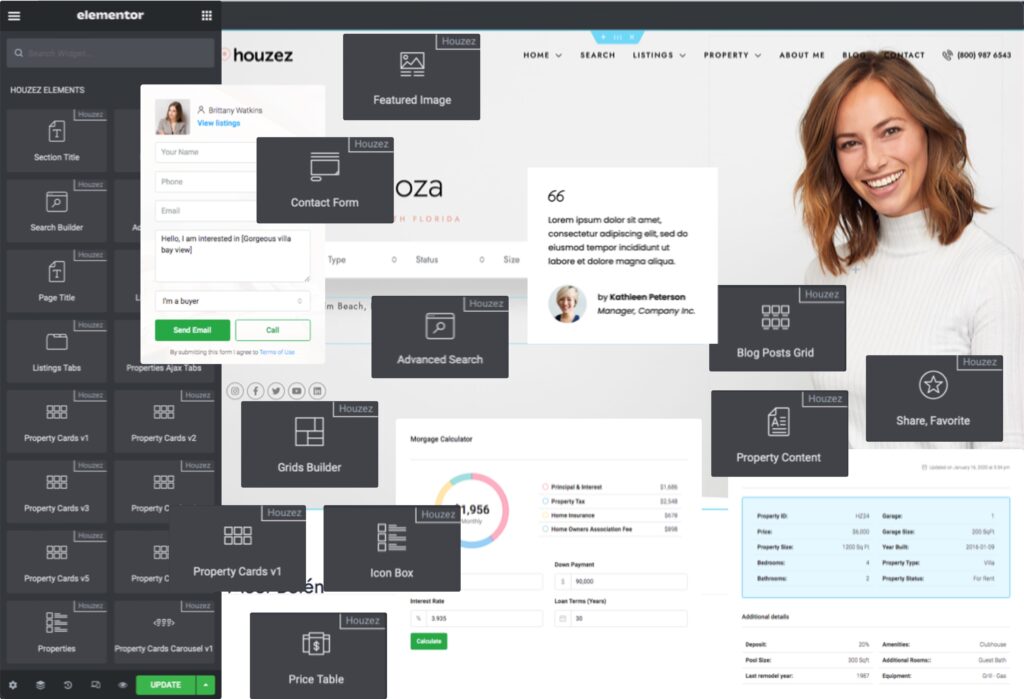
170+ Elementor Widgets
Houzez includes over 150 custom Elementor widgets designed specifically for real estate. These include property search widgets, listing grids, featured property sections, agent cards, mortgage calculators, and area-specific content blocks. Each widget connects directly to the listing database and supports dynamic data.
Theme Builder Integration
Houzez extends Elementor’s Theme Builder with real estate-specific conditions. You can create a single property detail template and set it to apply to all listings automatically, or create different templates for different property types. The same applies to agent pages, agency pages, and area pages.
Search Builder
The Search Builder in Houzez lets you create and configure property search forms without writing a line of code. You choose which fields to include, set the search logic, and the builder generates a fully functional search widget you can place anywhere on the site using Elementor.
Pre-Built Property, Agent, and Agency Templates
Houzez includes ready-made templates for property detail pages, agent profiles, agency pages, and area pages. These templates are built with Elementor and use dynamic content throughout. Agencies import them, adjust the design to match the client’s brand, and the functionality works immediately.
Area Pages
Area pages are important for local SEO. Houzez includes a dedicated area page system that connects neighbourhood content to relevant listings automatically. Combined with Elementor’s design tools, area pages can be visually rich and SEO-effective.
Houzez Studio
Houzez Studio is a library of professionally designed website templates and section blocks. Agencies can import a complete website design in minutes and customise it using Elementor. This eliminates the initial design phase entirely on projects where clients are happy with a professionally designed starting point.
Real-World Example: Building a Real Estate Website for a Local Agency Using Elementor
Here is a practical walkthrough of a real project to illustrate how the workflow comes together.
The Brief
A mid-sized residential real estate agency in Melbourne needed a new website. They had twelve agents, around 80 active listings, and offices in two suburbs. They wanted a modern design, a working property search, individual agent pages, and a contact form that forwarded leads to their CRM.
Week 1: Setup and Import
The agency installed WordPress on a managed host, activated Houzez, and imported the Houzez Studio template that most closely matched the client’s visual preferences. The demo content gave them a working homepage, property archive, agent listing page, and individual listing template from day one.
Week 1–2: Customisation
Using Elementor, the developer updated the colour palette, swapped the logo, replaced all placeholder images with the client’s photography, and adjusted the homepage layout to prioritise the search bar above the fold. The property detail template was updated to include a mortgage calculator widget and a section for nearby properties.
Week 2: Data and Integrations
The agency’s 80 listings were imported using Houzez’s CSV import tool. Each agent profile was created and connected to their listings. The Search Builder was configured with the filters the agency needed: suburb, price range, property type, and number of bedrooms. The contact forms were connected to the client’s CRM via a webhook integration.
Week 2–3: Testing and Launch
The site was tested across desktop, tablet, and iPhone. Mobile adjustments were made using Elementor’s responsive controls. An SEO plugin was configured with property schema markup. After client sign-off on the staging site, the site was migrated to the live domain.
The Outcome
The project was delivered in seventeen working days. The client could manage their own listings and agent profiles from day one. Three months after launch, the site was ranking on the first page for several suburb-specific property search queries.
Frequently Asked Questions
Is Elementor good for real estate websites?
Yes, Elementor is a strong choice for real estate website development when combined with a dedicated real estate theme. Elementor handles design, layout, and client editing. The real estate theme provides property management, search, dynamic templates, and listing functionality. Together they cover all the requirements a professional real estate website needs.
Does Elementor support property listings?
Elementor does not include property listing functionality out of the box. However, when you use Elementor with a real estate theme like Houzez, you get full property listing management including custom fields, search filters, map integration, and dynamic templates built in Elementor.
How long does it take to build a real estate website with Elementor?
An agency using Elementor with a real estate theme and pre-built templates can typically build and launch a complete real estate website in one to three weeks. The exact timeline depends on the number of listings, the level of customisation required, and the speed of client feedback.
Can clients manage their own listings after launch?
Yes. Real estate themes like Houzez include a listing management interface that real estate clients can use without needing developer access. Elementor also allows clients to update design elements like banner text and images, depending on the permissions you configure.
Does Elementor affect SEO for real estate websites?
Elementor itself does not negatively impact SEO if the site is well-optimised. You still need a dedicated SEO plugin, optimised images, fast hosting, and properly configured meta titles and descriptions. Elementor produces clean HTML output and supports responsive design, both of which are important SEO factors.
What is the difference between Elementor Free and Elementor Pro for real estate?
Elementor Pro is required for most real estate website projects. It adds Theme Builder, dynamic content widgets, the form builder, and custom post type support. These features are essential for building property detail templates, agent pages, and search results layouts dynamically.
Do I need to know how to code to use Elementor for real estate websites?
Not for standard projects. Elementor is designed for visual development. When combined with a real estate theme that includes pre-built templates and search tools, most of a real estate website can be built without writing a single line of code. Custom code is available when needed for advanced requirements.
What is the best WordPress theme for real estate websites using Elementor?
Houzez is among the most widely used WordPress themes for real estate websites built with Elementor. It includes over 150 Elementor widgets, a Search Builder, Theme Builder integration, pre-built templates for listings, agents, and area pages, and the Houzez Studio template library. It is designed specifically for real estate website development at an agency level.
Final Thoughts
Elementor remains one of the best tools available for real estate website development. It accelerates design work, reduces the gap between developer and designer, and gives clients the autonomy to manage their own content after launch. For agencies building multiple real estate projects a year, it is a foundational part of a scalable workflow.
However, Elementor for real estate websites only reaches its full potential when it is combined with a real estate platform that handles property data, search, and dynamic templates. On its own, Elementor is a design tool. Paired with Houzez, it becomes a complete real estate website development system.
If you are evaluating Elementor for your next real estate project, the answer is almost always yes. The question is what you pair with it. Choose a theme built around Elementor, invest time in building reusable templates, and your agency will deliver better real estate websites in less time with every project.